
What Is a Smart Home?
—from plain-language guide to every system—from energy and lighting to sound, curtains, appliances, and the hub that connects them
A smart home is not a single product or a single system. It is a collection of systems — energy, lighting, climate, audio, window coverings, security, appliances and control — that can communicate with each other and respond to how you live. Some of these systems must be planned during building design. Others can be added at any time. Understanding the difference between them is the most useful starting point for any homeowner thinking about smart home technology.
The phrase smart home covers an enormous range of things. For some people it means asking a speaker to turn off the lights. For others it means a fully automated home that anticipates the family's schedule, manages energy across solar, battery and the grid, and adjusts every system to the season and time of day.
Both are smart homes. Neither is wrong. The difference is in how much of the home's behaviour has been connected, automated and personalised — and how much of the underlying infrastructure was planned at the right stage of construction.
This guide explains each system in plain language — what it does, what it controls, what examples of it look like in a real home, and critically: what needs to happen during construction versus what can be added later.
The Seven Systems of a Smart Home

A complete smart home is made up of seven distinct systems. Each can be installed independently. They become more powerful — and more genuinely useful — when they communicate with each other through a central hub or platform.

⚡ 1. Energy Management
What it does: Monitors and manages the flow of electricity through your home — from the solar panels on the roof to the battery in the garage, the grid connection, and every device that draws power inside. A smart energy system knows when to use solar power, when to store it in the battery, when to draw from the grid and when to export. It can shift heavy loads — dishwasher, washing machine, hot water system — to run when solar generation is at its peak.
Examples: Solar monitoring dashboard, battery storage management (Tesla Powerwall, Enphase), smart meters, hot water system timers linked to solar generation, EV charging scheduled to overnight rates or peak solar.
Needs during construction: Conduit from roof to electrical panel for solar cabling. Dedicated circuits for battery storage and EV charging. A smart meter capable of bidirectional measurement. Electrical panel with sufficient spare capacity for future loads. These must be specified in the electrical drawings during construction.
Can be added later: Solar panels and batteries can technically be retrofitted — but cost significantly more when the conduit, cabling pathways and panel capacity were not provisioned at construction. EV charging circuits retrofitted after plastering can require significant wall work. Plan the infrastructure during construction even if the products are not installed until later.

💡 2. Lighting Control
What it does: Controls when lights turn on and off, how bright they are, and what colour temperature they produce — automatically, on schedule, or in response to presence. A smart lighting system can dim living room lights at sunset, turn off every light when the last person leaves the house, brighten the kitchen to full daylight temperature at 7am, and create preset scenes for dinner, movie watching or morning routine.
Examples: Dimmer switches linked to an app or voice control, motion-triggered corridor lighting, automated outdoor lighting at dusk, colour-temperature adjustable lights that shift from cool morning light to warm evening light, whole-house off switch at the front door.
Needs during construction: Smart lighting works in two ways. Wired systems (most reliable) require smart switches or dimmers installed in every circuit — these go in during construction and require the electrician to install the correct switch type. Wireless systems use smart bulbs that replace standard bulbs and require no wiring changes — these can be added anytime. For best results in a new home, install smart switches at construction and use standard LED bulbs that the switch controls.
Can be added later: Smart bulbs can be added to any existing light fitting at any time. Smart switches require the correct wiring behind the plate — easy during construction, possible but more involved as a retrofit. The practical approach: specify smart-switch-compatible wiring at construction, install standard bulbs, upgrade to smart control when the timing suits.
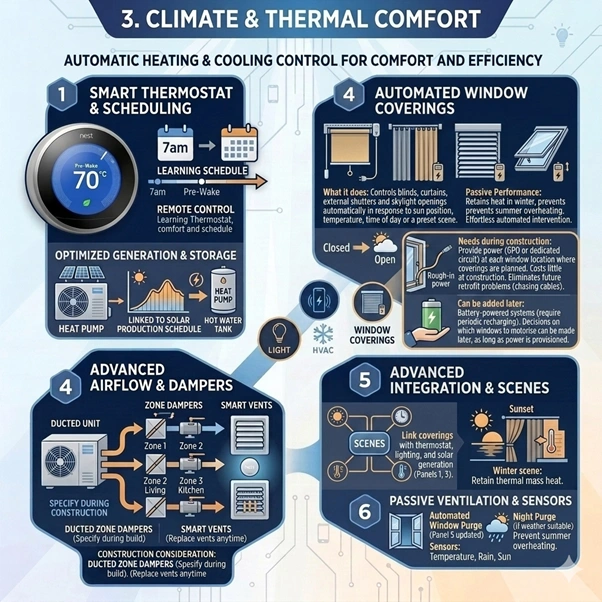
🌡️ 3. Climate and Thermal Comfort
What it does: Controls heating and cooling systems to maintain comfort automatically — learning schedules, responding to occupancy, and managing temperature across different zones of the house. A smart climate system can heat the bedroom to 20°C before the alarm goes off, cool the living room before the family arrives home, and turn everything off when the house is empty. In a passive solar home, a smart climate system also knows when to open windows for night purge ventilation and when to keep them closed.
Examples: Smart thermostats (Google Nest, Ecobee, Daikin online controller), zoned HVAC with room-by-room temperature control, heat pump hot water systems linked to solar generation schedules, automated window openers for night ventilation, smart vents that direct heating and cooling only to occupied rooms.
Needs during construction: In a ducted heating and cooling system, zone dampers must be installed during construction — retrofitting zone control to an existing ducted system is possible but expensive. The thermostat itself can be replaced with a smart model at any time. Smart vents require existing duct outlets to replace. For split systems, smart control is typically a Wi-Fi adapter added to the indoor unit — can be done any time.
Can be added later: The thermostat or controller can almost always be upgraded to a smart model without construction work. Zone control is the element that must be planned during construction for ducted systems.

🪟 4. Automated Window Coverings
What it does: Controls blinds, curtains, external shutters and skylight openings automatically — in response to sun position, temperature, time of day or a preset scene. In a passive solar home this is a genuine performance tool: closing heavy-lined curtains at sunset retains the heat the thermal mass collected during the day. Opening external blinds on the east facade before the western sun arrives prevents summer overheating. These are not luxuries — they are the manual interventions that most homeowners never make consistently, and that automated systems make effortlessly.
Examples: Motorised roller blinds, automated curtain tracks, electric external louvre systems, solar-responsive awnings that retract in high wind, skylight openers linked to temperature and rain sensors, automated insulated blinds for passive solar performance.
Needs during construction: Motorised systems require power at each window or track — this is the critical construction requirement. A standard window has no power supply. Adding power to motorised blinds after construction requires chasing cables through finished walls or running conduit on the surface. In a new home, the electrician can rough-in a power point or dedicated circuit at each window location where motorised coverings are planned — this costs very little at construction and eliminates the retrofit problem entirely.
Can be added later: Battery-powered motorised blind systems exist and can be added without wiring — they require periodic recharging. For heavy curtain tracks or external systems, wired power is strongly preferred. The decision about which windows to motorise can be made later. The power provision at each window should be made during construction.

🔊 5. Audio and Entertainment
What it does: Whole-home audio allows music or audio to play in any room, at different volumes, controlled from a phone or automatically. Smart home entertainment integrates television, streaming services, speakers and sometimes projection into a single controllable system — one button turns on the television, dims the lights, closes the curtains and sets the temperature for a movie.
Examples: In-ceiling or in-wall speakers in living areas, kitchen and outdoor spaces, multi-room audio platforms (Sonos, Denon HEOS), integrated TV and streaming control, home cinema rooms with dedicated acoustic treatment, outdoor entertainment speakers linked to indoor audio zones.
Needs during construction: In-ceiling and in-wall speakers require cabling during construction — the speaker cable runs from a central amplifier or switch to each speaker location. This must happen before the ceiling or wall is lined. Speaker placement also benefits from acoustic consideration during the design stage. Outdoor speakers require weatherproof cabling in conduit. A central audio distribution point — typically in a communications cabinet or dedicated rack — needs to be located and provided with power during construction.
Can be added later: Wireless speakers (Sonos, HomePod, Google Nest Audio) can be added anywhere at any time with no construction work. In-ceiling and in-wall speakers cannot be retrofitted without opening the ceiling or wall. The practical approach: plan for in-ceiling speakers in the rooms where it matters most (living, outdoor entertainment, main bedroom) and run cable during construction. Add wireless speakers in other areas as needed.

🔒 6. Security and Access Control
What it does: Manages who enters the home, monitors the property and alerts the owner to activity. Smart security has moved well beyond alarm systems — it now includes video doorbells that show who is at the front door from anywhere in the world, smart locks that can be unlocked remotely for a tradesperson and relocked automatically, cameras that distinguish between a person and a passing car, and sensors that detect broken glass, water leaks or carbon monoxide.
Examples: Video doorbell cameras, smart locks with keypad, app or voice control, indoor and outdoor cameras with motion detection and person recognition, glass break sensors, water leak detectors under sinks and near appliances, carbon monoxide and smoke detectors linked to the smart home platform, driveway presence sensors.
Needs during construction: Cameras and sensors are largely wireless and battery or solar powered — most can be added anywhere without construction work. The exception is hardwired camera systems, which provide more reliable power and better video quality but require cabling during construction. Smart locks replace the existing lock mechanism — no construction required but the door must be the right size and type for the lock. The most useful construction provision for security is a dedicated network cabinet or communications panel with power and network connections — this becomes the hub for all security devices.
Can be added later: Most smart security devices are deliberately designed for easy installation without construction. The practical exception is hardwired cameras — if whole-property camera coverage with buried conduit to outdoor locations is desired, this is significantly easier to do during construction or landscaping.

🍳 7. Smart Appliances
What it does: Connected appliances that can be controlled remotely, monitored for energy use, or integrated into the home's automation. A smart oven can be preheated from the car. A smart washing machine can be told to finish its cycle when solar generation is highest. A smart refrigerator can monitor its contents and alert when items need replacing. A smart hot water system can be scheduled to heat only when solar power is available.
Examples: Smart hot water systems with solar scheduling, Wi-Fi connected washing machine and dryer (run during solar peak hours), connected dishwasher (start remotely, schedule for off-peak), smart oven with remote preheat, connected rangehood linked to cooktop activity, smart garage door opener.
Needs during construction: Most smart appliances connect via Wi-Fi and require only a standard power connection — no special wiring beyond what any appliance requires. The exception is smart hot water systems that integrate with solar and battery management, which require the right type of control wiring between the hot water system and the energy management system. This is best specified during construction as part of the electrical design.
Can be added later: The large majority of smart appliances can be substituted for standard appliances at any time — when the appliance is replaced at end of life, specify a smart model. The smart functionality comes with the appliance, not with the wiring.

The Hub — How It All Connects
Each of the seven systems can work independently. The hub is what makes them work together.
A smart home hub is a central software platform — sometimes a physical device, sometimes a cloud service — that allows different systems to communicate with each other and respond to shared conditions. When the hub knows the sun has set, it can simultaneously dim the lights, close the blinds, and turn up the heating. When it knows the family has left the house, it can turn off all lights, set the heating to away mode and arm the security system.
The major hub platforms are Apple HomeKit, Google Home, Amazon Alexa and Samsung SmartThings. Professional-grade systems include Control4, Crestron and Savant. Each has different strengths — some are better at local control (works without internet), some have wider device compatibility, some offer more sophisticated automation logic.
The hub choice does not need to be made during construction. What needs to happen during construction is the provision of a network cabinet or communications panel in a central location with power, network connections and adequate ventilation. The hub — whatever platform is eventually chosen — lives here.
What Smart Home Is Not
The most common misunderstanding about smart home technology is equating it with smart appliances. A smart refrigerator that tells you when you are out of milk is a smart appliance. It is not a smart home.
A smart home is a building whose systems — not just its appliances — respond to how its occupants live. The building knows when the family is home. It knows the time of day, the season, the position of the sun. It uses this information to manage energy, comfort, light and security in ways that reduce both the effort required from the occupants and the energy consumed by the systems.
A house full of smart appliances but without a connected infrastructure — without smart switching, without an energy management system, without automated climate control, without a hub that allows the systems to communicate — is not a smart home. It is a house with expensive appliances.
The distinction matters because the investment in smart appliances is largely wasted without the underlying infrastructure. And the underlying infrastructure is largely free — it is the conduit and cabling decisions made during construction, which add very little cost at the right time and enormous cost when added later.
Frequently Asked Questions
Yes — most smart home systems are designed for retrofit installation. Smart bulbs, wireless speakers, video doorbells, smart locks, smart thermostats and connected appliances can all be added to an existing home without construction work. The systems that benefit most from being planned during construction are lighting control wiring, motorised window covering power supply, in-ceiling audio cabling, hardwired cameras and the energy management infrastructure for solar and battery integration. If you are planning a renovation, this is the right time to address these elements — not because smart home technology cannot be added later, but because adding it later costs significantly more.
The cost range is enormous — from a few hundred dollars for a starter smart speaker and some smart bulbs, to several hundred thousand for a fully integrated professional Control4 or Crestron system. The most cost-effective approach for a new home is to invest in infrastructure during construction (conduit, cabling, network cabinet, correctly provisioned electrical panel) and then add smart devices progressively over time. The infrastructure investment is typically 1–3% of construction cost. The device investment can be staged indefinitely as budget and priorities allow.
The right platform depends on which devices you already own, which ecosystem your phones and computers are in, and how much customisation you want. Apple HomeKit is the right choice for Apple-centric households who prioritise privacy and local processing. Google Home suits Android users and those who want broad compatibility with a simple interface. Control4 or Crestron are the right choice for homeowners who want professional installation, maximum reliability and sophisticated automation — at a significantly higher cost. We recommend discussing the platform choice with a smart home integrator who is product-neutral before committing, as the platform decision affects which devices you can use throughout the life of the system.
It can — but only if the right systems are in place and set up correctly. The greatest energy savings come from smart energy management (scheduling heavy loads to solar peak hours, managing battery charge and discharge), smart climate control (heating and cooling only occupied zones, setting back temperature when the house is empty) and smart lighting (motion-triggered lights that turn off automatically). A study by the Rocky Mountain Institute found that smart home energy management can reduce household energy consumption by 10–20%. In Canberra's energy-intensive climate, with a well-designed passive solar home and a solar and battery system managed by smart energy controls, the savings can be substantially higher.
They are complementary — a passive solar home with smart home technology performs significantly better than either approach alone. The passive solar home captures and stores solar energy through its building fabric — orientation, thermal mass, glazing and shading. The smart home manages the active systems that complement this fabric: scheduling the hot water system to run during solar peak hours, closing insulated blinds automatically at sunset to retain the heat the slab collected during the day, opening windows when the outdoor temperature drops below the indoor temperature for night purge cooling, and charging the battery from excess solar generation for use in the evening. In a well-integrated Canberra home, the smart home layer can close the gap between a good passive solar home and a net-zero energy home.
Understanding what smart home systems do — and what they need from the building — is the foundation for making good design decisions. In a separate essay, we cover specifically what needs to happen during the design and construction process to prepare a new Canberra home for smart home technology.
— Shiraz Atelier · Building Design Canberra · shirazatelier.com.au